Project Overview
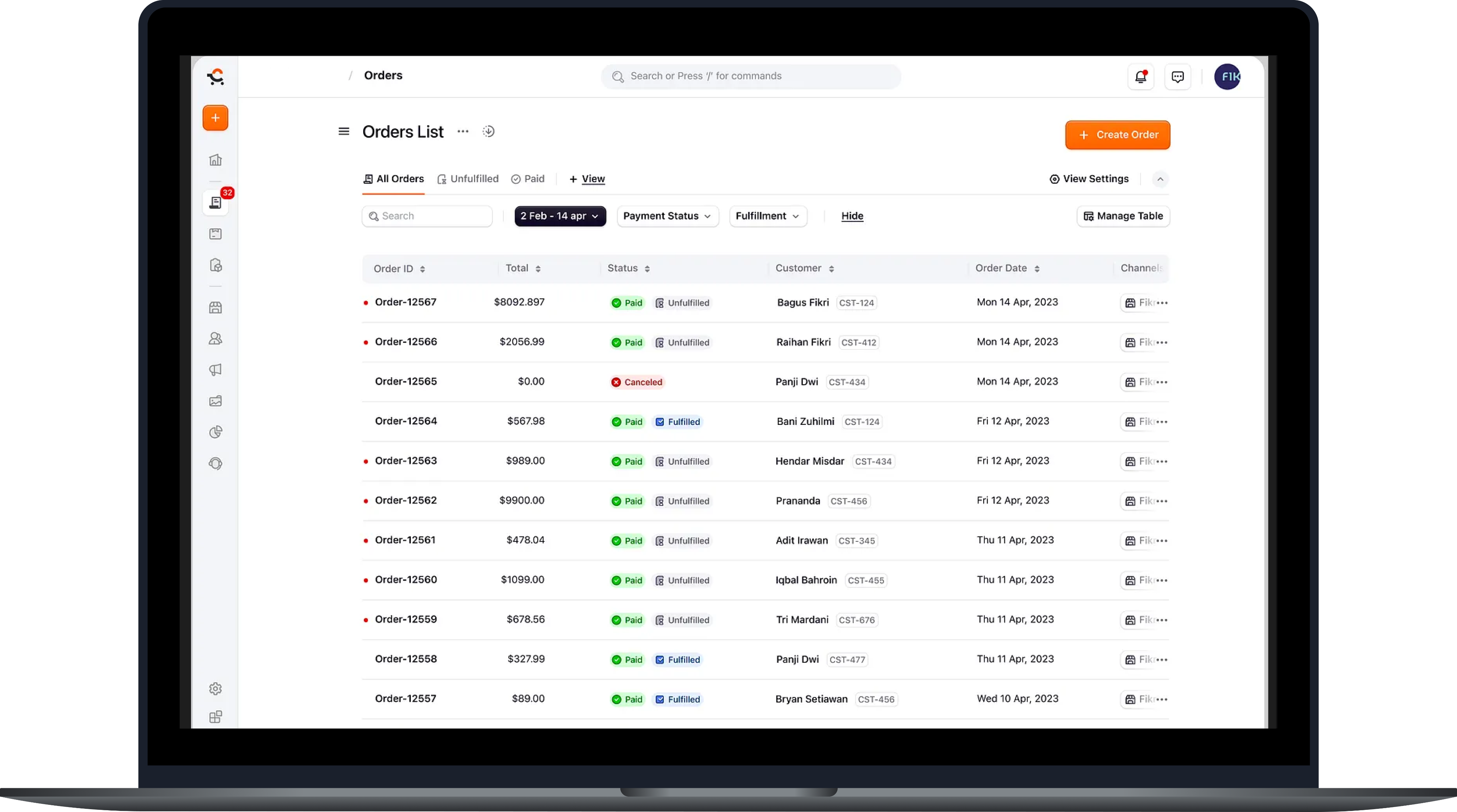
SmartSCM is a centralised supply chain management platform developed for mid-to-large-scale enterprises struggling with fragmented workflows and manual processes. The product streamlines the end-to-end procurement cycle—from Business Order (BO) generation to payment reconciliation—by replacing outdated systems like spreadsheets and fragmented emails.
Problem Statement
Processes were scattered across emails, Excel, & disjointed systems. Vendor delays, poor inventory visibility, & misaligned finance tracking led to missed deliveries & budget issues, lack of seamless end-to-end flow & miss use of the time and funds. Multiple access for approval of the PO create redundancy of the orders and miss communication with vendors and having issues in inventory management like filling the unnecessary items.
Project Goal
To build a centralised procurement platform that digitises & connects the entire supply chain—ensuring faster PO cycles, transparent vendor communication, accurate delivery tracking, & streamlined finance settlements.
Project Solution
SmartSCM supports role-based workflows across procurement, vendor interaction, DO tracking, inventory management, & finance. Features like smart PO templates, real-time quote comparison, DO tracking & auto payment mapping reduce errors, speed up TAT, & offer better clarity via contextual UX decisions.
Design Process
Based on the research findings, we started addressing the main issues and focused on the solutions for it firstly, Second of all after fixing the issues we started to stream line the flow of the application to create the final product
- Here we breakdown all the application into bits and pieces and started understanding each of the application individually.
- We created few modules based on the requirement and started to ideate how to navigate with all the modules for the best use-case to solve.
- We started doing R&D for each of the module and create one stop application call SmartSCM.
- We did Stakeholder Interviews for modules and details of their expectation of Procurement, Finance, Vendors, etc..
Research Data says
- Role-Based Access – Ensures each user sees only what's relevant and actionable to them.
- User Insight: Users wanted visibility over automation. Dashboards & alerts were prioritised over background rules.
- We initiated ideation with cross-functional groups. Each activity was focused on pain point resolution:
- Crazy 8s: Generated 50+ raw ideas in 15 minutes—top concepts included predictive PO and chatbot-based finance ticketing.
- Journey Mapping: For three core users—Procurement Head, Vendor, and Finance Officer—highlighting drop-off points. Captured workflows and friction points across Procurement, Finance, and Vendor Management teams.
- Card Sorting: Procurement staff grouped navigation terms; results formed our primary menu (PO, Quotes, DOs, Payments, Reports).
- Dot Voting: 20 participants selected top UX features. The "Real-Time DO Tracker" emerged as the most critical need.
- Competitive Benchmarking: Studied SAP Ariba, Coupa, Oracle for better understanding & limitations to use.
Research Finding
Finding
Manual PO handing led to frequent miscommunication
Delays in vendor quotes and multiple approvals creates multi order acceptance for vendors and initiated supply
Vendors found current interface is hard to use and states of the order was missing
Procurement team couldn't easily the vendor quotes
Finance team had no visibility into PO fulfilment and having multiple conversations for final bill payment
Insights
Introduced digital PO lifecycle tracking with status updates.
Implemented auto-expiry reminders and limiting to create multiple orders, if needed keeping user notified about previous order.
Design a simplified and experience rich UI and added order/inventory states to the interface.
Using AI to filtering the quotes and finding the top 4 best based upon selection.
Introduced a finance dashboard with linked PO and the payment based on the role and access.
Workflow
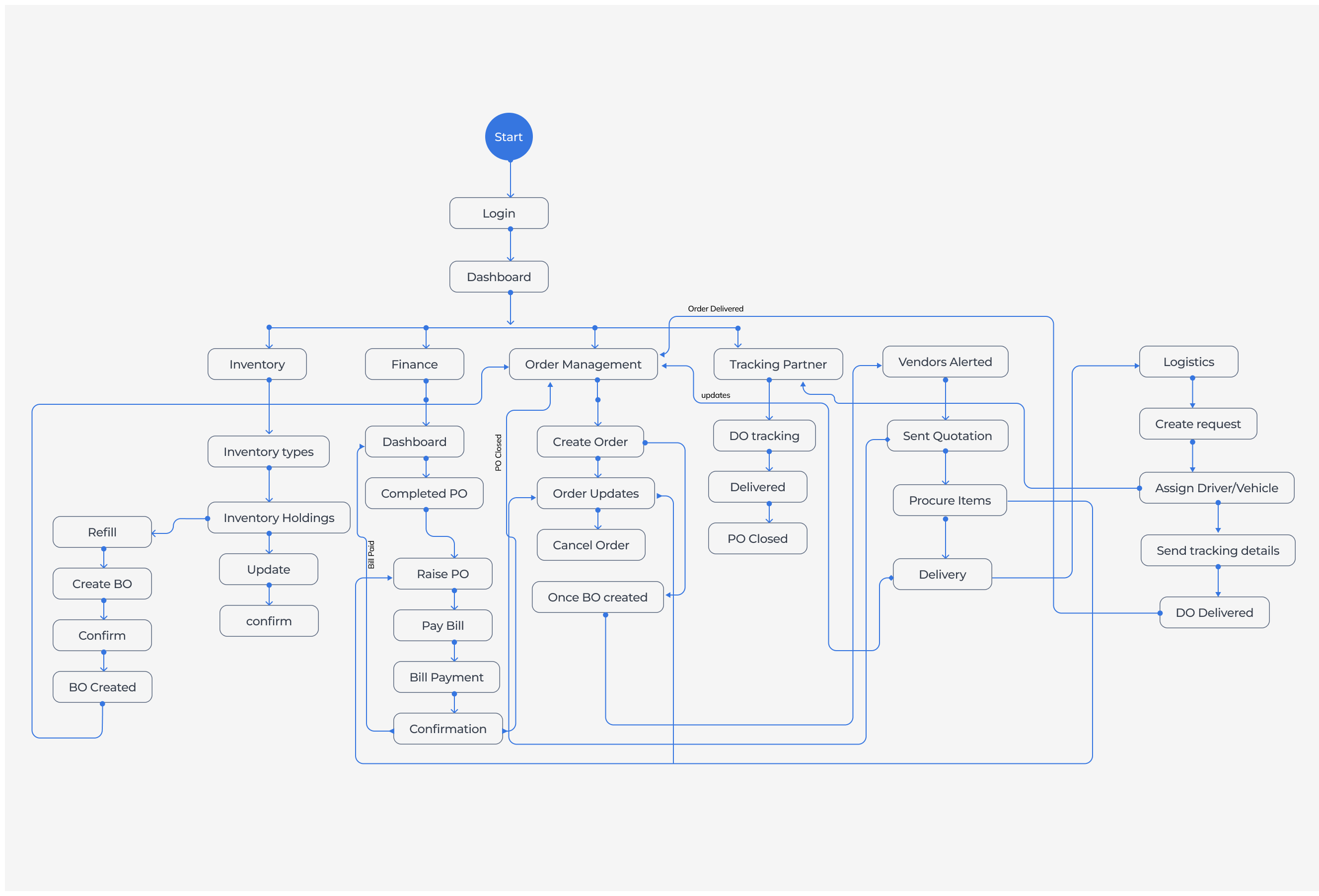
We created a lo-level workflow for our understanding based on the artefacts we collected and had a brainstorming session with our customer for enhancing the application with all necessary modules and navigation to it. This is just the 1st level draft can't show final consolidated Information architecture due to NDA.
Module fixing
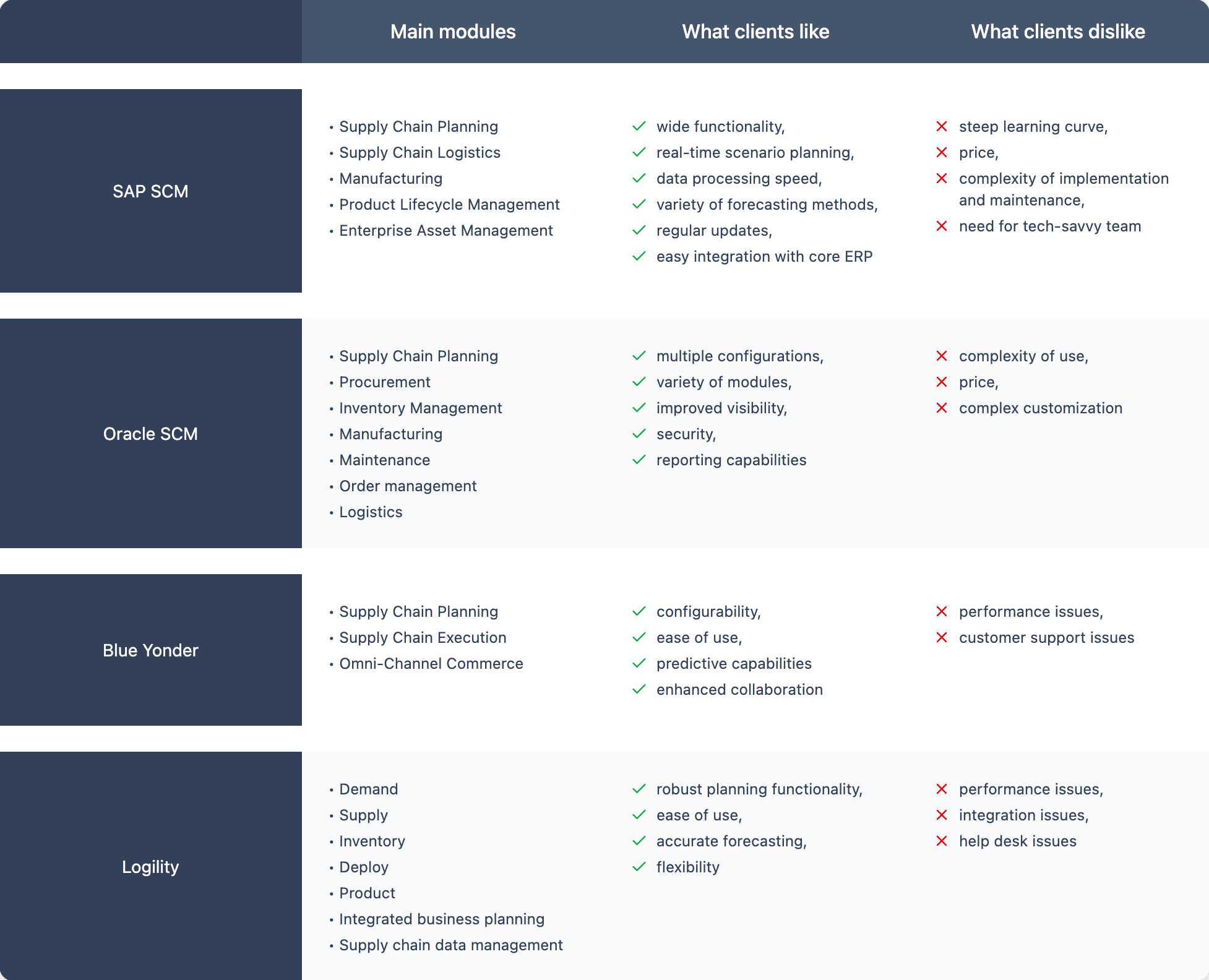
- We did competitor analysis for more value adding to the application, How others are selling, what is USP?, What modules they are using?, How they can customise the application based on the requirement and came up with this points
Design Implementation
While started working on the lo-fed we implement a few design insights that we covered while gathering the data or analysis points which need to communicate the actual usage of the application.
- Progressive Disclosure
- Complex functions (quote filtering, delivery logs) shown only when relevant.
- Example: Finance team sees payment info only after PO is marked as delivered.
- Contextual Alerts
- Status indicators for each PO, DO, and payment avoid manual checks.
- Example: A yellow alert shows "Quote Deadline Missed" for escalations.
- Role-Based Dashboards
- Each role sees KPIs and data tailored to their function.
- Example: Vendor sees “Active Quotes” and “Pending DOs”, not internal finances.
- Edge Case Resilience
- Cancelled POs, offline payments, and partial deliveries are built-in with exception logs.
- Smart Alerts — notifications for overdue quotes, pending approvals, or stock mismatches. Example: "You already have 300 units in stock. Are you sure you want to raise a PO for 500?"

Progressive disclosure
UX Scenario
PO lifecycle management
Quotation Comparison view
Finance dashboard details and view
Inventory overlap warnings/alerts
What is hidden initially
Actions like “Approve, Cancel, Track shipment”
Item-wise quote details, delivery timeline
Vendor wise or PO wise spend breakdown
Stock already available message display
How/when it is revealed
Based on PO Status (Draft, Created, Delivered)
Expand vendor row / click view full quote
Click on summary tiles to drill down further
Triggered only if PO matches current stock
Why this helps
Avoids showing irrelevant actions prematurely
Keeps overview clean, enables deep comparison
Supports both high level and deep level views
Prevents unnecessary alerts, context-sensitivity
User Feedback
Streamlined PO processing
Enhanced clarity in pricing structures
Improved budgeting accuracy
Reduced stockout occurrences
Visual Design
Started working on the mockups after both paper work and Lo-fed wireframes, Here started working on the components and variables. The aim is to provide the clear navigation and maintain the consistency across the application. Here some of the mockups are modified and displaying the very first version of the iteration.
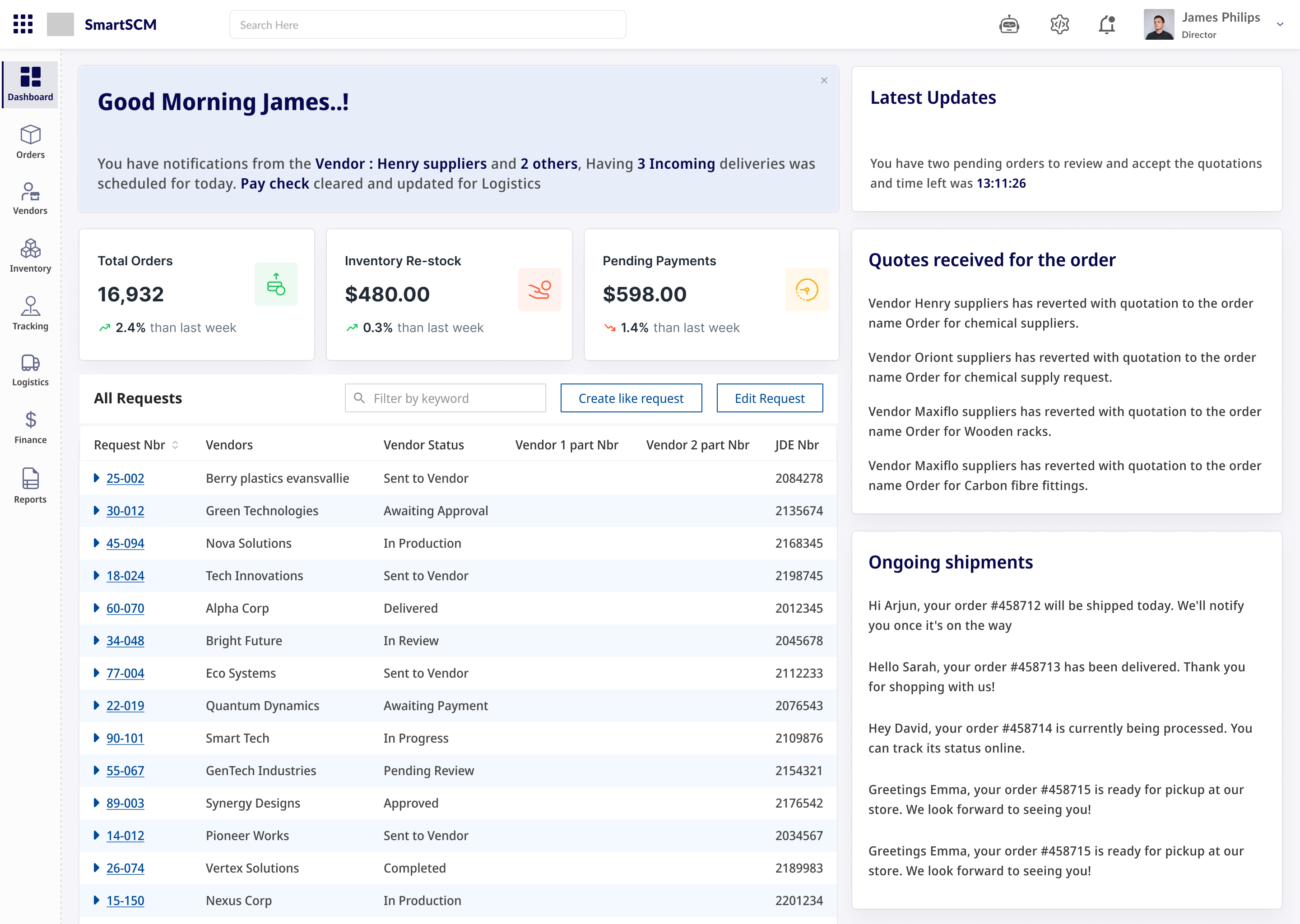
The dashboard details
- Created a welcome note with the updates for every day, This will shown on very first time login to the day, this is to make sure the updates should be read compulsory if the user wants to remove it we provided the remove on the top of the panel.
- We are displaying the major updates like the quotes received to the order, the list of ongoing shipments to the users and this can be customised as per the user needs based on the user need
- All of these are customisable widgets that makes user to keep his activity updated all the time.
- Navigation through the side (left nav) will help user to navigate from the module to module without any deviation and the data user changed will be kept saved for some time in the cache.
The Invoicing
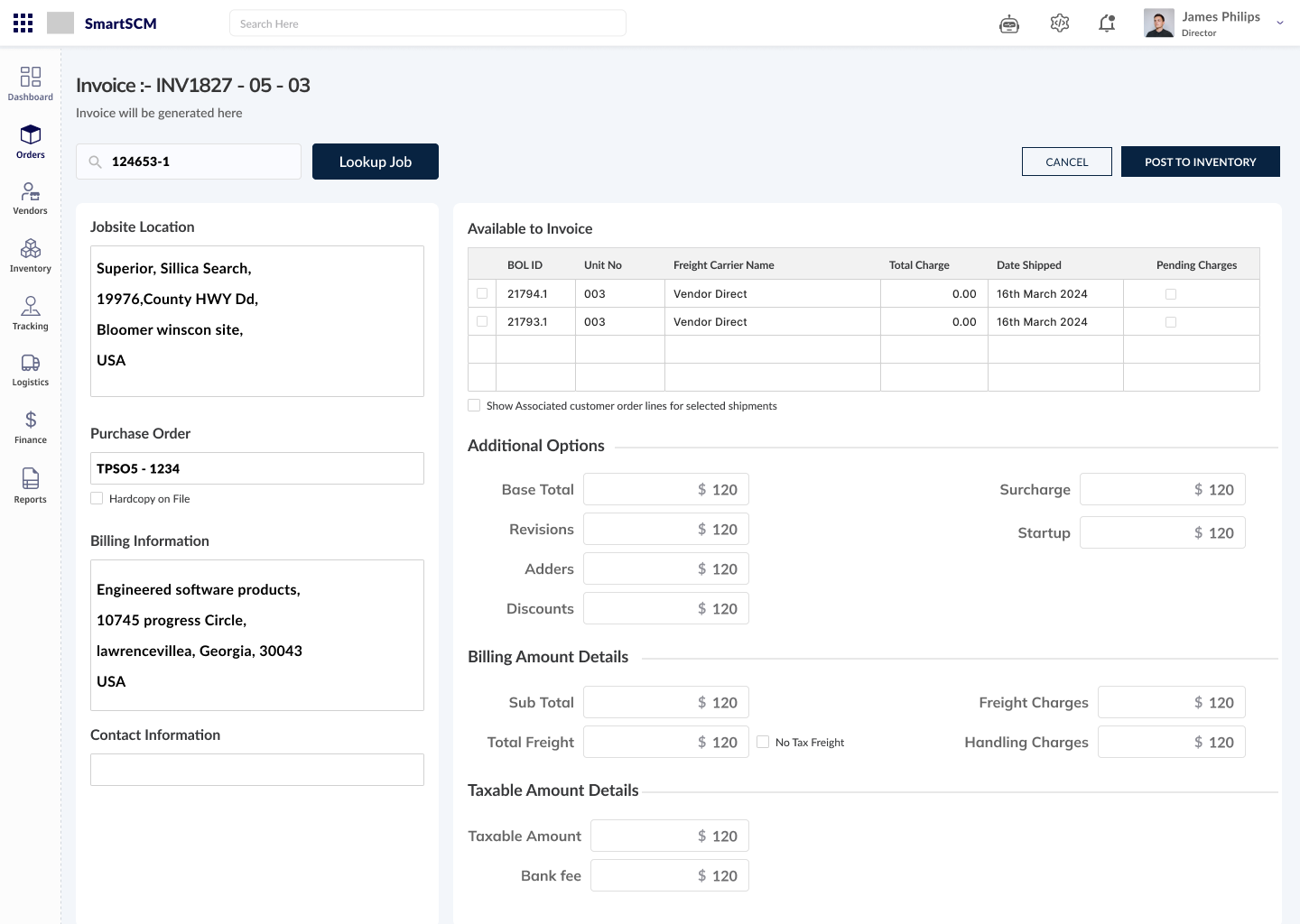
- Once after the PO is created with the vendor quotation then our system will raise dummy invoice with the final amount which need to be paid to the vendor.
- Here based on the invoice user can send it to the inventory module admin so that he will start monitoring the order as well because the inventory will be filled this order.
- Here User can add the details or item to it so that the actual order will be updated based upon the approvals
- This can be searched by the order Id and also the quotation raised by the vendor as well. Here we implemented Federated search concept to retrieve the data
The Order preview
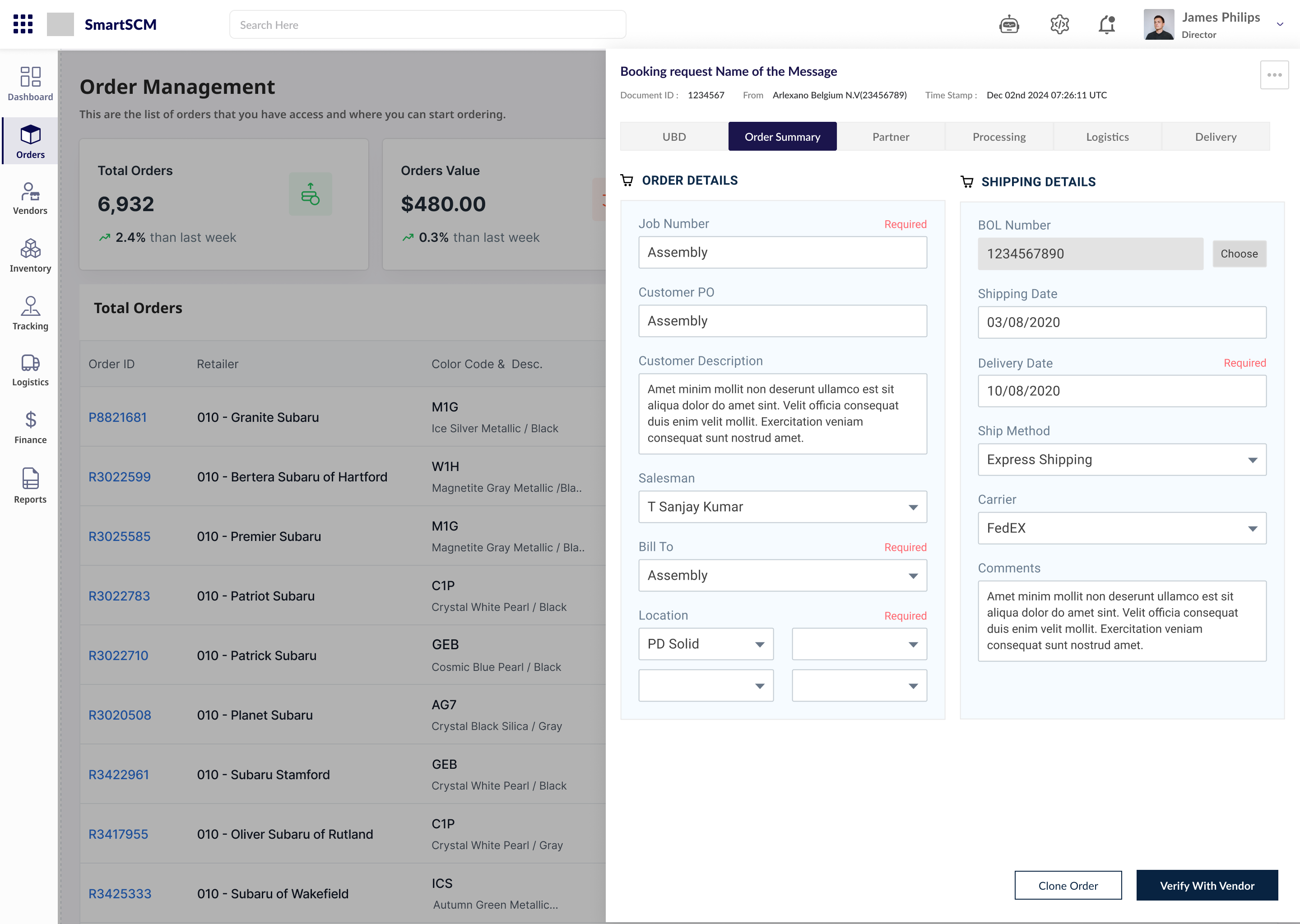
- The order preview consists of full order details and the summary of the order.
- Here in the preview we used wizard kind of pattern to go forward and backward to see the data and the current stage of the order.
- The flow was, Once the partner approved the order id, it will go to next step for procuring from the vendors to the logistics for delivering the order to the company.
- Once the Logistics team received the order they will assign the fleet to delivery the order, once assigned owner will be notified.
- There after the tracking id will be generated and will shared, and user can track the order here in same portal.
- All these can be displayed in the left panel in the order preview screen, in such a way we designed the application.
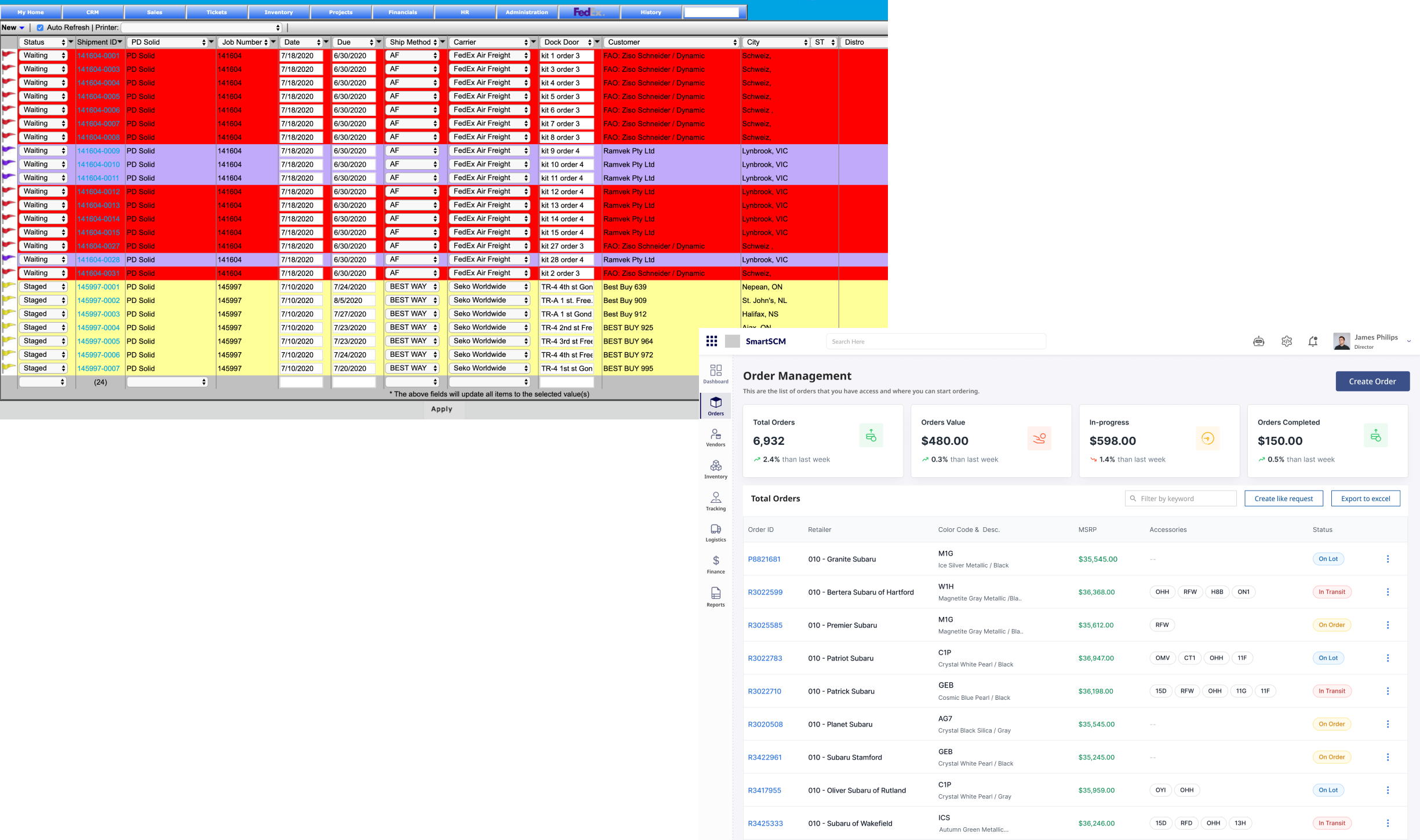
Before (Legacy)
- The order screen in the legacy has direct information to the list of the orders created and which can be further changed/modified.
- The problem was to use the filters and count the orders and need to use filters again to check the status of the orders.
- Here no preview of the order was shown and once the order was created user can't be able to edit the order if needed.
- Here flow was create the order then order was created and again copy the order id and assign the inventory to it, which make complex in creating PO.
The solution
- Displaying the KPI's on the first view of the Order management dashboard so that the quick stats can be viewed.
- Here by clicking on the order Id all the orders details with the items user requested to vendor will be displayed.
- The features like to clone the order for creating the order again with the same items was added.
- Once the order was created it will go to the concern admin to notify him so that all the module admins will be alerted.
New Application
To problems faced in the creating the order was solved by using all the insights and implementing in the design, here the design goes for 5+ Iterations and multiple discussion with stakeholder and finally the product was ready and how it helps was listed below:
- Increased Efficiency: Automation reduces manual errors and repetitive tasks, allowing users to focus on higher-value activities like strategic decision-making and vendor relationship management.
- Faster Decision-Making: Real-time insights and notifications help users stay informed and act quickly, improving operational speed across departments.
- Better Visibility: Dashboards and real-time tracking give users a clear, centralised view of the procurement process, from PO creation to payment reconciliation, allowing them to anticipate issues and make data-driven decisions.
- Cost Savings: The application reduces procurement cycle times, minimises errors, and ensures timely payments, all of which contribute to significant cost savings over time.
- Faster PO Creation: Smart templates and auto-fill functionality reduce PO creation time by up to 78%, allowing procurement officers to generate and send POs in minutes, rather than hours.
- Vendor Selection Made Easy: With real-time quote comparison, officers can assess pricing, delivery timelines, and vendor reliability at a glance, streamlining the vendor selection process.
- Reduced Errors & Delays: Automated status updates and real-time tracking prevent errors like missed deliveries or incorrect orders, ensuring that the procurement process is seamless and timely.
Appreciation Received✨
We received appreciation for the effort we did and for research we conducted, Putting the extra efforts to delivering the application within the tight timelines and making it extremely efficient.
Exceptional work.!
Creating and managing purchase orders is no longer a headache. What used to take hours now takes minutes. The quote comparison matrix is a game-changer
Pactrick Julie
Chief Operations Officer, PDInstore
Project Learnings
- Design for Clarity, Not Just Efficiency: Even if automation saves time, users need to feel in control. Clear UI elements like real-time trackers, progress bars, and status tags build trust and reduce anxiety—especially in high-stakes processes like procurement and finance.
- Role-based UX is essential. Procurement officers need quick PO actions, finance needs reconciliation tools, and vendors want simplicity. Tailoring the experience per persona drove better engagement and satisfaction.
- Building detailed journey maps early helped align user needs with business flows. It ensured we were solving real friction points, not just designing pretty screens.
- Initial discovery was just the beginning. Post-launch usability testing, analytics tracking, and contextual interviews revealed new opportunities and blind spots we couldn't foresee in phase one.
Other Project

PharmaWrap
Optimised the packaging workflow for a Pharma company by streamlining the procurement of branded cardboard used for medicine distribution
AxCS
A legacy system of Property Insurance system was made easy and improved the usage of the efficiency of the application.

Arlanxeo
An AI-native workspace that clubs a conversational assistant with a live shipment-tracking dashboard, so asking why a delivery is late and seeing the answer happen in the same breath.
Thank you!
Some names and data was changed due to NDA.
Subject to copyrights. All rights reserved